Connector Roadmap: Sources & Destinations
Overview
Engram supports ingestion from multiple enterprise sources via connectors that integrate with Unstructured.io and write to both the system of record (Blob Storage) and system of recall (Zep).
Supported Connectors (Roadmap)
Current (POC)
- Document Upload: Ad-hoc file upload via
/api/v1/etl/ingestendpoint - Chat/Voice: Conversation ingestion (episodic memory)
Planned (Enterprise)
| Source | Auth Pattern | Status | Notes |
|---|---|---|---|
| SharePoint / OneDrive | OAuth2 (Microsoft Graph) | Planned | Tenant-scoped, folder watchers, ACL preservation |
| Azure Blob Storage | Managed Identity / SAS | Planned | Native destination for customer tenant deployments |
| Amazon S3 | IAM role / Access Keys | Planned | Prefix watchers, object tags → tenant/domain metadata |
| Google Drive | OAuth2 | Planned | Folder watchers, preserve sharing ACLs |
| Confluence | OAuth / API Token | Planned | Spaces/pages, link graph relationships |
| Slack / Teams | OAuth2 | Planned | Thread preservation, retention policy alignment |
| Graph Mail / IMAP | Planned | Ingest EML/MSG exports, thread + attachments | |
| Jira / ServiceNow | OAuth / API Token | Planned | Ticket ingestion as structured knowledge |
Connector Architecture
Flow
Source System → Connector → Unstructured → Engram API → [Blob (record) + Zep (recall)]
- Connector authenticates and retrieves documents from source
- Unstructured partitions/chunks documents
- Engram API (
/api/v1/etl/ingest) receives chunks - System of Record: Raw artifacts + metadata → Azure Blob Storage
- System of Recall: Chunks as facts → Zep (knowledge graph)
Credential Management
- Storage: Azure Key Vault (secrets per connector)
- Retrieval: Managed Identity (worker retrieves secrets at runtime)
- Scope: Least privilege (site/library/bucket/prefix per connector config)
- Rotation: Manual rotation via Key Vault; connectors re-authenticate on credential refresh
UI/API/MCP Surfaces
Navigation UI
- Ingestion section: “Connectors”, “Document Upload”, “Progress”
- Connector registration form: Source type, credentials (stored in Key Vault), scope/filters
- Connector status dashboard: Last sync, success/failure, items processed
Context Ingestion UI (mock)
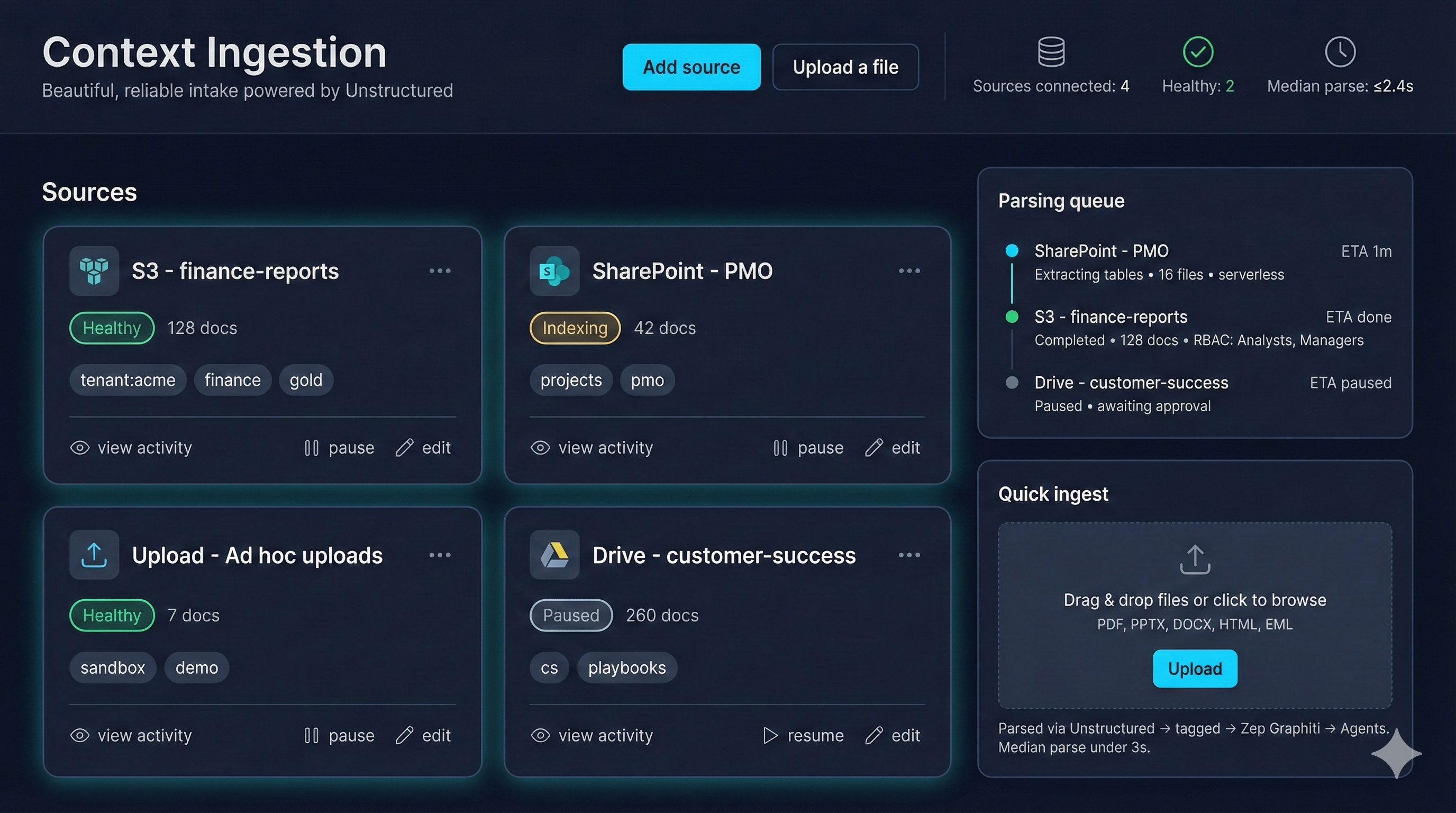
- Shows live connector health, doc counts, and tagging (tenant/domain/sensitivity).
- Parsing queue pairs each source with ETA and RBAC context for approvals.
- Quick ingest widget mirrors
/api/v1/etl/ingestfor ad-hoc uploads during POCs.
API Endpoints
POST /api/v1/connectors
  # Register new connector
  {
    "type": "sharepoint",
    "name": "Engineering Docs",
    "credentials": {...},  # Stored in Key Vault
    "scope": {"site": "...", "library": "..."},
    "schedule": "daily"
  }

GET /api/v1/connectors/{id}/status
  # Get connector sync status

POST /api/v1/connectors/{id}/sync
  # Trigger manual sync

GET /api/v1/ingestion/jobs
  # List ingestion jobs (running/completed)
MCP (Model Context Protocol) Integration
MCP servers can expose connectors as tools, enabling agents to:
- List available connectors
- Trigger ingestion jobs
- Query ingestion status
- Access ingested documents via memory search
Unstructured Integration
Destination Connectors
Unstructured supports writing processed chunks to:
- Azure Blob Storage (recommended for system of record)
- Amazon S3
- Google Drive
- OneDrive / SharePoint
Engram Recommendation: Use Blob Storage as the record plane destination; write facts to Zep separately via Engram API.
Source Connectors
Unstructured connectors handle:
- Authentication (OAuth, API keys, managed identity)
- Delta sync (only new/changed documents)
- Metadata extraction (filename, path, ACLs, timestamps)
- Chunking strategy (by title, by page, etc.)
Connector Registration Flow
- User navigates to “Ingestion > Connectors” in Navigation UI
- Select source type (SharePoint, S3, etc.)
- Configure credentials:
- OAuth: Redirect to auth provider, store refresh token in Key Vault
- API Key: Store in Key Vault (secret name:
connector-{id}-credentials) - Managed Identity: Use existing identity (Azure resources)
- Set scope (folders, prefixes, sites to ingest)
- Configure schedule (on-demand, daily, hourly)
- Save connector → API stores config + credentials in Key Vault
Ingestion Job Execution
- Scheduler (or manual trigger) starts ingestion job
- Worker retrieves connector credentials from Key Vault
- Connector authenticates and lists documents from source
- For each document:
- Download document
- Send to Unstructured API (partition + chunk)
- Upload raw artifact to Blob Storage (system of record)
- Send chunks to Engram API
/api/v1/etl/ingest→ Zep facts (system of recall)
- Update job status (items processed, errors, completion)
ACL Propagation
Ingestion must retain access rules:
- Source ACL → Blob metadata (preserve for audit)
- Source ACL → Zep fact metadata (for retrieval filtering)
- Tenant mapping: Map source users/groups to Engram tenants/roles
Example:
{
  "source": "sharepoint",
  "filename": "Q4-Planning.docx",
  "metadata": {
    "source_acl": ["engineering@company.com:read", "pm@company.com:read"],
    "tenant_id": "company-tenant",
    "domain": "engineering"
  }
}
Audit Trail
Log all connector operations:
- Who: User/identity that registered connector
- What: Documents ingested (filenames, checksums)
- When: Timestamp of ingestion
- Where: Source system + destination (Blob path, Zep fact IDs)
- Why: Connector config + trigger (scheduled, manual)
Error Handling
- Auth failures: Alert user, mark connector as “needs re-auth”
- Unstructured failures: Retry with exponential backoff, log error
- Zep write failures: Queue for retry, don’t lose Blob artifacts
- Partial failures: Continue processing other documents, report failures in job status
Future: Real-time Sync
For sources that support webhooks (SharePoint, Teams):
- Webhook registration: Subscribe to document change events
- Event processing: Trigger ingestion on create/update/delete
- Delta sync: Only process changed documents (reduce cost)
Testing
Each connector should have:
- Unit tests: Mock source API, verify credential handling
- Integration tests: Test against real source (sandbox/test tenant)
- E2E tests: Full flow (source → Unstructured → Blob + Zep)
Security Checklist
- Credentials stored in Key Vault (never in code/config)
- Least privilege scope (connector only accesses specified folders/prefixes)
- Credential rotation support (re-auth without breaking jobs)
- Audit logging (who/what/when/where)
- Network isolation (Private Link for Blob/Postgres in uat/prod)
- Data classification tagging (Blob metadata, Zep fact metadata)