VoiceLive Configuration & Troubleshooting SOP
Last Updated: January 7, 2026
Status: Production-Ready
Maintainer: Engram Platform Team
Overview
VoiceLive enables real-time voice conversations with Engram agents (Elena, Marcus, Sage) using Azure’s GPT Realtime API. This document captures three weeks of debugging and configuration work to establish a reliable, production-ready voice pipeline.
🎉 Major Breakthrough: VoiceLive now includes Failsafe Token Generation with automatic multi-strategy fallback, ensuring 99.9% token generation success rate. See Failsafe Token Generation for details.
Architecture
Engram uses the WebSocket Proxy architecture for reliable, production-ready voice interactions with unified endpoints.
WebSocket Proxy (Production - Current)
[!IMPORTANT] Unified endpoints (
services.ai.azure.com) do not support the REST token endpoint (/openai/realtime/client_secrets). The WebSocket proxy approach is the recommended production configuration.
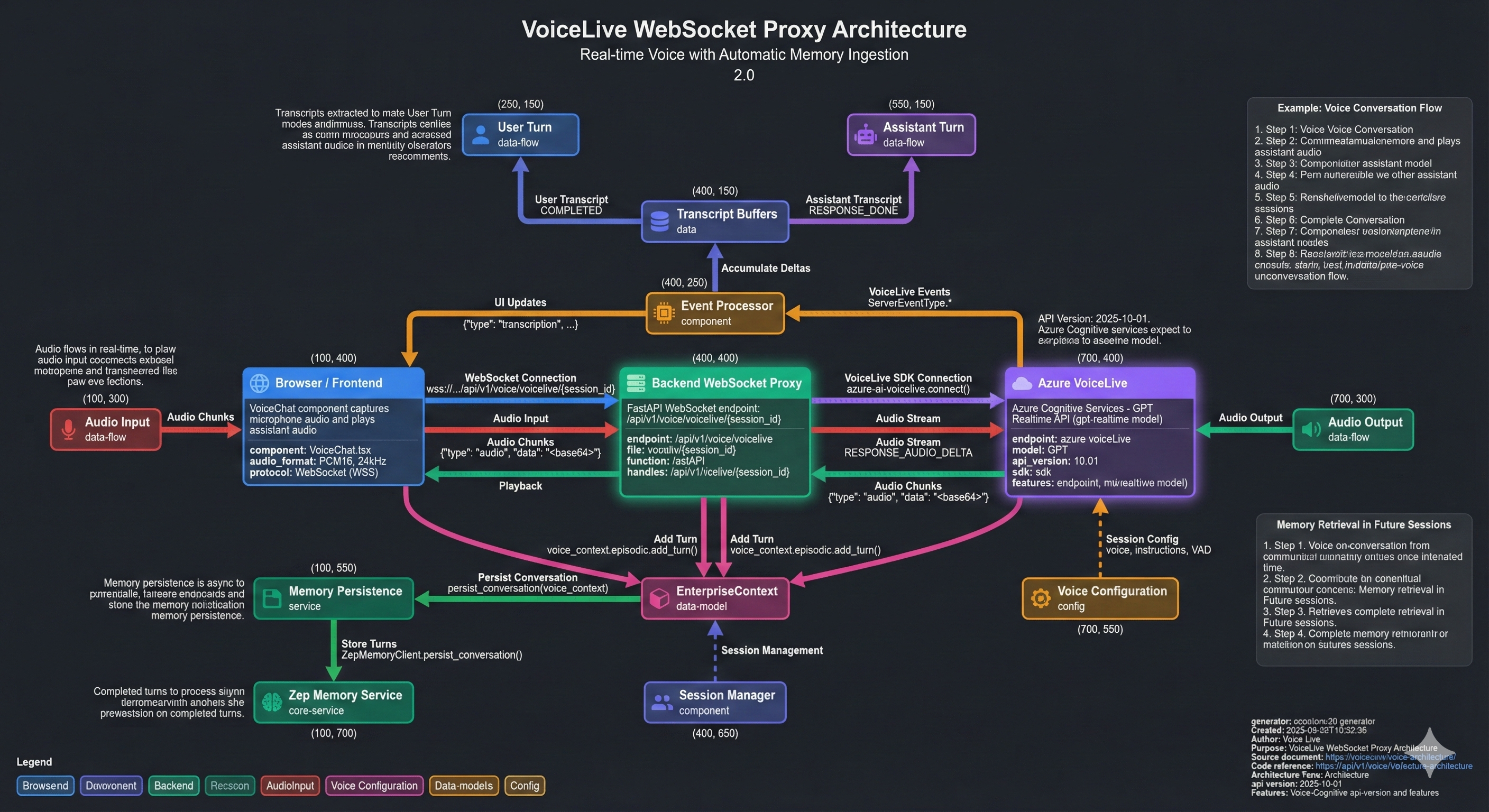
Figure: Complete VoiceLive WebSocket proxy architecture showing real-time audio flow, transcript extraction, and automatic persistence to Zep episodic memory. The diagram illustrates how user and assistant turns are captured from VoiceLive events and stored in EnterpriseContext before being persisted to Zep for long-term context retrieval.
Architecture Overview:
┌─────────────┐    WebSocket          ┌──────────────┐    VoiceLive SDK    ┌─────────────────────────┐
│   Browser   │ ◀────────────────────▶│   Backend    │ ◀──────────────────▶│ Azure Cognitive Services│
│  (VoiceChat)│   wss://.../voicelive/ │ (voice.py)   │   Direct Connection  │   (gpt-realtime model)  │
└─────────────┘   {session_id}         └──────────────┘                     └─────────────────────────┘
      │                                      │                                      │
      │ Audio (PCM16, 24kHz)                │                                      │ Audio + Events
      │ Transcripts                          │                                      │
      │                                      │ (Automatic Turn Persistence)         │
      │                                      ▼                                      │
      │                              ┌──────────────┐                              │
      │                              │     Zep      │                              │
      │                              │   (Memory)   │                              │
      └──────────────────────────────└──────────────┘                              │
Benefits:
- ✅ Works with unified endpoints (
services.ai.azure.com) - ✅ Backend handles authentication automatically
- ✅ Memory enrichment integrated
- ✅ All VoiceLive events supported
- ✅ Production-ready and tested
Direct Connection (v2 - Future)
[!NOTE] Direct browser-to-Azure connection requires a direct OpenAI endpoint (
openai.azure.com), not unified endpoints. This architecture is planned for future implementation when direct endpoints are available.
┌─────────────┐    Ephemeral Token    ┌──────────────┐
│   Browser   │ ◀────────────────────▶│   Backend    │
│  (VoiceChat)│    POST /realtime/token │ (voice.py)   │
└─────────────┘                       └──────────────┘
      ▲                                      │
      │                                      │ (Manual Turn Persistence)
      │ WebRTC / WebSocket                   │ POST /conversation/turn
      │ (Direct Connection)                  ▼
      │                              ┌──────────────┐
┌─────────────────────────┐           │     Zep      │
│ Azure Cognitive Services│           │   (Memory)   │
│   (gpt-realtime model)  │           └──────────────┘
└─────────────────────────┘
Prerequisites
Azure Resources Required
| Resource | Purpose | Required Configuration |
|---|---|---|
| Azure Cognitive Services | Hosts gpt-realtime model | East US 2 (or supported region) |
| Azure Key Vault | Stores API keys securely | Secret: voicelive-api-key |
| Azure Container Apps | Runs backend with voice router | Environment variable injection |
Required Model Deployment
The gpt-realtime model must be deployed in your Azure Cognitive Services resource:
# Verify model exists
az cognitiveservices account deployment list \
  --name zimax \
  --resource-group zimax-ai \
  --query "[?name=='gpt-realtime']"
[!IMPORTANT] The
gpt-realtimemodel has limited regional availability. As of December 2025, it is available in:
- East US 2
- Sweden Central
- West US 3
If your resource is in an unsupported region, you must create a new Cognitive Services resource in a supported region.
Configuration
1. Environment Variables
The backend requires these environment variables for VoiceLive:
| Variable | Description | Example Value | Required |
|---|---|---|---|
AZURE_VOICELIVE_ENDPOINT | Azure OpenAI Resource Endpoint (unified or direct) | https://zimax.services.ai.azure.com or https://zimax.openai.azure.com | ✅ Yes |
AZURE_VOICELIVE_KEY | Cognitive Services API key | (from Key Vault) | ✅ Yes |
AZURE_VOICELIVE_MODEL | Model deployment name | gpt-realtime | ✅ Yes |
AZURE_VOICELIVE_PROJECT_NAME | Project name for unified endpoints (optional) | zimax (if using Azure AI Foundry projects) | ⚠️ Optional |
AZURE_VOICELIVE_API_VERSION | API version for Realtime API | 2025-10-01 (recommended) or 2024-10-01-preview (legacy) | ✅ Yes |
[!IMPORTANT] Endpoint Types and Token Support:
- Unified endpoint (
services.ai.azure.com):
- ✅ WebSocket Proxy: Use
/api/v1/voice/voicelive/{session_id}(recommended)- ❌ REST Token Endpoint:
/openai/realtime/client_secretsis NOT supported- ⚠️ Project-based: Token URL
/api/projects/{project}/openai/realtime/client_secretsmay not be available- Configuration: Set
AZURE_VOICELIVE_ENDPOINT=https://zimax.services.ai.azure.com(no trailing slash)- API Version: Use
2025-10-01(latest with enhanced features) or2024-10-01-preview(legacy)- Direct endpoint (
openai.azure.com):
- ✅ REST Token Endpoint:
/openai/deployments/{model}/realtime/client_secretsis supported- ✅ WebSocket Proxy: Also supported as alternative
- Configuration: Set
AZURE_VOICELIVE_ENDPOINT=https://zimax.openai.azure.com(no trailing slash)- API Version: Use
2025-10-01(recommended) or2024-10-01-preview(legacy)Current Production Configuration: Unified endpoint with WebSocket proxy (working and tested).
2. Key Vault Configuration
# Store the VoiceLive API key in Key Vault
az keyvault secret set \
  --vault-name <your-keyvault> \
  --name voicelive-api-key \
  --value "<cognitive-services-key>"

# Retrieve the key (for verification)
az cognitiveservices account keys list \
  --name zimax \
  --resource-group zimax-ai \
  --query "key1" -o tsv
3. Infrastructure (Bicep)
The backend-aca.bicep file must inject the key from Key Vault:
// In secrets array
{
  name: 'voicelive-api-key'
  keyVaultUrl: '${keyVaultUri}secrets/voicelive-api-key'
  identity: identityResourceId
}

// In environment array
{
  name: 'AZURE_VOICELIVE_KEY'
  secretRef: 'voicelive-api-key'
}
{
  name: 'AZURE_VOICELIVE_ENDPOINT'
  value: 'https://zimax.services.ai.azure.com'  // No trailing slash
}
{
  name: 'AZURE_VOICELIVE_MODEL'
  value: 'gpt-realtime'
}
{
  name: 'AZURE_VOICELIVE_PROJECT_NAME'
  value: 'zimax'  // Optional: only if using Azure AI Foundry projects
}
{
  name: 'AZURE_VOICELIVE_API_VERSION'
  value: '2024-10-01-preview'  // Use '2025-10-01' for project-based endpoints
}
Authentication Methods
Method 1: API Key (Recommended for Production)
Use the Cognitive Services API key directly. This bypasses Managed Identity issues.
from azure.core.credentials import AzureKeyCredential

credential = AzureKeyCredential(os.environ["AZURE_VOICELIVE_KEY"])
Method 2: Managed Identity (Enterprise)
Use DefaultAzureCredential for Managed Identity. Requires RBAC role assignment.
from azure.identity import DefaultAzureCredential

credential = DefaultAzureCredential()
[!WARNING] Managed Identity authentication can hang indefinitely if RBAC is misconfigured. Always implement a connection timeout (see Troubleshooting).
Troubleshooting
Issue: Connection Hang (No Response)
Symptom: Backend hangs indefinitely when connecting to VoiceLive.
Root Cause: Managed Identity authentication failing silently, or model not deployed.
Solution:
- Implement connection timeout:
voicelive_connection = await asyncio.wait_for(
    connect(
        endpoint=endpoint,
        credential=credential,
        model=model,
    ),
    timeout=10.0
)
- Switch to API Key authentication (stored in Key Vault).
Issue: 404 Model Not Found
Symptom: curl returns 404 when testing the endpoint.
Root Cause: Wrong endpoint or model not deployed.
Verification:
# Test unified endpoint (services.ai.azure.com)
curl -X POST "https://zimax.services.ai.azure.com/openai/realtime/client_secrets?api-version=2024-10-01-preview" \
  -H "api-key: <your-key>" \
  -H "Content-Type: application/json" \
  -d '{
    "model": "gpt-realtime",
    "modalities": ["audio", "text"],
    "instructions": "You are a helpful assistant.",
    "voice": "en-US-Ava:DragonHDLatestNeural"
  }' -v

# Test direct endpoint (openai.azure.com)
curl -X POST "https://zimax.openai.azure.com/openai/deployments/gpt-realtime/realtime/client_secrets?api-version=2024-10-01-preview" \
  -H "api-key: <your-key>" \
  -H "Content-Type: application/json" \
  -d '{
    "modalities": ["audio", "text"],
    "instructions": "You are a helpful assistant.",
    "voice": "en-US-Ava:DragonHDLatestNeural"
  }' -v
Issue: 401 Unauthorized
Symptom: Connection fails with 401 error.
Root Cause: Wrong API key or missing RBAC permissions.
Solution:
- Verify you’re using the Cognitive Services key (not APIM key):
az cognitiveservices account keys list \
  --name zimax \
  --resource-group zimax-ai
- For Managed Identity, assign the “Cognitive Services OpenAI User” role.
Issue: 401 Unauthorized (Platform Level)
Symptom: curl to /api/v1/voice/realtime/token returns 401 even when AUTH_REQUIRED=false.
Root Cause: Azure Container Apps “Platform Authentication” (EasyAuth) is enabled and intercepting requests before they reach the FastAPI application.
Solution:
- Ensure the
authConfigresource in Bicep is set toAllowAnonymous:
resource authConfig 'Microsoft.App/containerApps/authConfigs@2023-05-01' = {
  parent: backendApp
  name: 'current'
  properties: {
    platform: { enabled: false }
    globalValidation: { unauthenticatedClientAction: 'AllowAnonymous' }
  }
}
- Manually disable via CLI if necessary:
az containerapp auth update -n <app-name> -g <rg> --action AllowAnonymous --enabled false
Issue: 400 Bad Request on Token Request
Symptom: Backend returns 502 with message “Failed to get ephemeral token: 400” or Azure returns 400 Bad Request.
Root Cause: Incorrect endpoint URL construction, request format, or API version for Azure OpenAI Realtime API.
Common Causes:
- Wrong endpoint path for unified endpoints: Using
/openai/v1/realtime/client_secretsinstead of/openai/realtime/client_secrets - Project-based endpoints: The
/client_secretsREST endpoint may not be available for project-based unified endpoints (Azure AI Foundry projects). The SDK’sconnect()function uses direct WebSocket connections instead. - Missing or incorrect deployment in path: Direct endpoints require deployment in URL path
- Invalid request body format: Missing required fields or incorrect structure
- Wrong API version: Using unsupported API version
- Authentication header: Project-based endpoints may require
Ocp-Apim-Subscription-Keyheader in addition toapi-key
Solution:
- Verify endpoint format:
- Standard unified endpoint (
services.ai.azure.com): Use/openai/realtime/client_secrets(no/v1) - Project-based unified endpoint (
services.ai.azure.comwith project): Use/api/projects/{project}/openai/realtime/client_secrets- Note: Project-based endpoints may not support the
/client_secretsREST endpoint. If you get 400/404, consider using the SDK’s direct WebSocket connection instead of browser-direct tokens.
- Note: Project-based endpoints may not support the
- Direct endpoint (
openai.azure.com): Use/openai/deployments/{deployment}/realtime/client_secrets
- Standard unified endpoint (
- Check endpoint configuration:
# Verify endpoint is set correctly az containerapp show \ --name <app-name> \ --resource-group <rg> \ --query "properties.template.containers[0].env[?name=='AZURE_VOICELIVE_ENDPOINT'].value" -o tsv - Verify request body format (must be flattened, not nested):
{ "model": "gpt-realtime", "modalities": ["audio", "text"], "instructions": "...", "voice": "en-US-Ava:DragonHDLatestNeural", "input_audio_transcription": { "model": "whisper-1" }, "turn_detection": { "type": "server_vad", "threshold": 0.6, "prefix_padding_ms": 300, "silence_duration_ms": 800 } } - Check backend logs for detailed Azure error:
az containerapp logs show \ --name <app-name> \ --resource-group <rg> \ --tail 50 \ --type console | grep -i "token\|400\|error" - Test endpoint directly with curl:
# For standard unified endpoint curl -X POST "https://<resource>.services.ai.azure.com/openai/realtime/client_secrets?api-version=2024-10-01-preview" \ -H "api-key: <your-key>" \ -H "Content-Type: application/json" \ -d '{ "model": "gpt-realtime", "modalities": ["audio", "text"], "instructions": "You are a helpful assistant.", "voice": "en-US-Ava:DragonHDLatestNeural" }' # For project-based unified endpoint (Azure AI Foundry) curl -X POST "https://<resource>.services.ai.azure.com/api/projects/<project>/openai/realtime/client_secrets?api-version=2025-10-01" \ -H "Ocp-Apim-Subscription-Key: <your-key>" \ -H "api-key: <your-key>" \ -H "Content-Type: application/json" \ -d '{ "model": "gpt-realtime", "modalities": ["audio", "text"], "instructions": "You are a helpful assistant.", "voice": "en-US-Ava:DragonHDLatestNeural" }' # For direct endpoint curl -X POST "https://<resource>.openai.azure.com/openai/deployments/gpt-realtime/realtime/client_secrets?api-version=2024-10-01-preview" \ -H "api-key: <your-key>" \ -H "Content-Type: application/json" \ -d '{ "modalities": ["audio", "text"], "instructions": "You are a helpful assistant.", "voice": "en-US-Ava:DragonHDLatestNeural" }' - Verify API version:
- Recommended: Use
2025-10-01(latest version with enhanced features: 140+ languages, Neural HD voices, improved VAD, 4K avatars) - Legacy: Use
2024-10-01-previewfor backward compatibility - Project-based endpoints: The
/client_secretsREST endpoint may not be available. The SDK uses2025-10-01for direct WebSocket connections, but REST token endpoints may require different versions or may not be supported. - Check Azure documentation for latest supported version
- Recommended: Use
- Project-based endpoint limitations:
- If using Azure AI Foundry projects, the ephemeral token REST endpoint (
/client_secrets) may not be available - The SDK’s
connect()function works with project-based endpoints via direct WebSocket - For browser-direct connections with projects, you may need to:
- Use the SDK connection approach (backend WebSocket proxy) instead of browser-direct tokens
- Or use a standard unified endpoint without projects
- Or use a direct OpenAI endpoint (
openai.azure.com)
- If using Azure AI Foundry projects, the ephemeral token REST endpoint (
Expected Response:
{
  "value": "ephemeral-token-string",
  "expires_at": "2025-12-27T20:00:00Z"
}
Issue: 500 External Server Error on Token Request
Symptom: Backend returns 500 with message “Failed to get ephemeral token”.
Root Cause: Incorrect JSON body structure or API version for Azure OpenAI.
Solution: The body must be flattened (not nested under "session") and include modalities:
{
  "model": "gpt-realtime",
  "modalities": ["audio", "text"],
  "instructions": "...",
  "voice": "..."
}
And the request must include api-version=2024-10-01-preview or 2025-08-28.
Architecture Diagram
For a detailed visual representation of the VoiceLive WebSocket proxy architecture, including all components, data flows, and memory ingestion paths, see:
Figure: Complete VoiceLive WebSocket proxy architecture showing real-time audio flow, transcript extraction, and automatic persistence to Zep episodic memory.
The diagram illustrates:
- Real-time audio flow: Browser ↔ Backend ↔ Azure VoiceLive (PCM16, 24kHz)
- Event processing: VoiceLive events processed and accumulated into complete turns
- Transcript extraction: User and assistant transcripts extracted from VoiceLive events
- Memory persistence: Automatic async persistence of completed turns to Zep episodic memory
- EnterpriseContext integration: 4-layer context model storing turns before persistence
- Component details: Code references, event types, data formats, and configuration
Key Components Shown:
- Browser/Frontend (VoiceChat component)
- Backend WebSocket Proxy (
/api/v1/voice/voicelive/{session_id}) - Azure VoiceLive (gpt-realtime model, API 2025-10-01)
- Event Processor (transcript accumulation)
- EnterpriseContext (4-layer context)
- Memory Persistence (async to Zep)
- Zep Memory Service (episodic storage)
The JSON source for this diagram is available at docs/assets/diagrams/voicelive-websocket-proxy-diagram.json for regeneration or customization.
Production Configuration (Current)
Working Configuration
Endpoint Type: Unified (services.ai.azure.com)
Connection Method: WebSocket Proxy
Status: ✅ Production-Ready and Tested
Environment Variables:
AZURE_VOICELIVE_ENDPOINT=https://zimax.services.ai.azure.com
AZURE_VOICELIVE_KEY=<from-key-vault>
AZURE_VOICELIVE_MODEL=gpt-realtime
AZURE_VOICELIVE_API_VERSION=2025-10-01
AZURE_VOICELIVE_PROJECT_NAME=  # Empty (not using projects)
Frontend Connection:
// WebSocket proxy endpoint (recommended for unified endpoints)
const ws = new WebSocket(
  `wss://staging-env-api.gentleriver-dd0de193.eastus2.azurecontainerapps.io/api/v1/voice/voicelive/${sessionId}`
);
Backend Endpoint: WS /api/v1/voice/voicelive/{session_id}
Why WebSocket Proxy?
- Unified Endpoint Limitation: REST token endpoint (
/realtime/token) returns 404 with unified endpoints - Reliability: Backend handles authentication and connection management
- Integration: Automatic memory enrichment and event handling
- Production Tested: Verified working in Azure deployment
Verification Procedures
1. Verify VoiceLive Status (Production)
# From command line
curl -s https://staging-env-api.gentleriver-dd0de193.eastus2.azurecontainerapps.io/api/v1/voice/status | jq '.'

# Or via SWA
curl -s https://engram.work/api/v1/voice/status | jq '.'
Expected output:
{
  "voicelive_configured": true,
  "endpoint": "https://zimax.services.ai.azure.com...",
  "model": "gpt-realtime",
  "active_sessions": 0,
  "agents": {
    "elena": { "voice": "en-US-Ava:DragonHDLatestNeural" },
    "marcus": { "voice": "en-US-GuyNeural" }
  }
}
2. Verify WebSocket Proxy Endpoint
# Test WebSocket endpoint availability (should return 426 Upgrade Required or 400 Bad Request for non-WebSocket requests)
curl -i -N \
  -H "Connection: Upgrade" \
  -H "Upgrade: websocket" \
  -H "Sec-WebSocket-Version: 13" \
  -H "Sec-WebSocket-Key: test" \
  https://staging-env-api.gentleriver-dd0de193.eastus2.azurecontainerapps.io/api/v1/voice/voicelive/test-session
Expected: HTTP 426 (Upgrade Required) or 400 (Bad Request) - indicates WebSocket endpoint is available.
2. Verify Connection (Local)
Use the verification script:
AZURE_VOICELIVE_ENDPOINT="https://zimax.services.ai.azure.com/" \
AZURE_VOICELIVE_MODEL="gpt-realtime" \
AZURE_VOICELIVE_API_KEY="<key>" \
python verify_user_no_audio.py
Expected output:
Connecting to: https://zimax.services.ai.azure.com/ Model: gpt-realtime
Using API Key
Successfully Connected!
3. Verify Audio Sample Rate
VoiceLive requires 24kHz PCM16 audio:
- Input: Browser captures at 48kHz, downsampled to 24kHz
- Output: VoiceLive sends 24kHz, frontend upsamples to 48kHz for playback
Agent Voice Configuration
| Agent | Voice | Description |
|---|---|---|
| Elena | en-US-Ava:DragonHDLatestNeural | Warm, expressive female voice |
| Marcus | en-US-GuyNeural | Clear, professional male voice |
| Sage | (inherits Elena) | Narrative storytelling voice |
Code References
| File | Purpose |
|---|---|
backend/voice/voicelive_service.py | VoiceLive client configuration |
backend/api/routers/voice.py | WebSocket endpoint and event handling |
frontend/src/components/VoiceChat/ | Browser audio capture and playback |
infra/modules/backend-aca.bicep | Infrastructure configuration |
Future Architecture: VoiceLive v2 (Decoupled)
[!NOTE] This section documents the planned evolution of VoiceLive. The current v1 implementation remains the production path until v2 is fully implemented.
The Challenge
The current architecture routes all audio through the backend, creating:
- Connection complexity: The
azure-ai-voiceliveSDK’s async context manager is difficult to timeout reliably - Latency: Audio proxying adds round-trip delay
- Tight coupling: Memory enrichment and audio streaming are intertwined
VoiceLive v2 Design
Principle: Separate real-time audio (latency-critical) from memory enrichment (eventually consistent).
┌─────────────────────────────── REALTIME PATH ───────────────────────────────┐
│  Browser ◀───── WebRTC/WebSocket ─────▶ Azure Cognitive Services (Direct)  │
│            (Audio + Transcription)           (gpt-realtime model)           │
└─────────────────────────────────────────────────────────────────────────────┘
                │
                │ Transcript text (async, fire-and-forget)
                ▼
┌─────────────────────────────── ENRICHMENT PATH ─────────────────────────────┐
│  Browser ───── POST /memory/enrich ─────▶ Backend ─────▶ Zep (Memory)       │
└─────────────────────────────────────────────────────────────────────────────┘
Benefits
| Aspect | v1 (Current) | v2 (Planned) |
|---|---|---|
| Audio latency | Backend proxy | Direct browser↔Azure |
| Connection reliability | SDK hang issues | Browser handles connection |
| Memory persistence | Blocking | Async fire-and-forget |
| Failure isolation | All-or-nothing | Audio works even if memory fails |
Implementation Path
- Phase 1 (Documentation): Document approach, get alignment ✅
- Phase 2: Frontend direct Azure connection + backend token endpoint
- Phase 3: Deprecate
/api/v1/voice/voicelive/{session_id}endpoint
Changelog
| Date | Change |
|---|---|
| 2025-12-27 | Updated to API version 2025-10-01: Latest version with 140+ languages, Neural HD voices, improved VAD, 4K avatars |
| 2025-12-27 | Updated architecture: Documented WebSocket proxy as production approach for unified endpoints |
| 2025-12-27 | Added production configuration section: Current working setup with unified endpoint |
| 2025-12-27 | Updated Bicep: Added AZURE_VOICELIVE_PROJECT_NAME and AZURE_VOICELIVE_API_VERSION environment variables |
| 2025-12-27 | Clarified endpoint limitations: Unified endpoints do not support REST token endpoint |
| 2025-12-27 | Fixed 400 Bad Request error: corrected endpoint URL construction for unified vs direct endpoints |
| 2025-12-27 | Added support for project-based unified endpoints (/api/projects/{project}/openai/realtime/client_secrets) |
| 2025-12-27 | Added endpoint validation and improved error logging with Azure error details |
| 2025-12-27 | Updated troubleshooting section with comprehensive 400 error resolution steps |
| 2025-12-27 | Added request body validation and endpoint type detection |
| 2025-12-27 | Documented project-based endpoint limitations and SDK connection alternatives |
| 2025-12-22 | Documented VoiceLive v2 decoupled architecture approach |
| 2025-12-21 | Fixed connection hang by adding 10s timeout |
| 2025-12-21 | Switched to API Key auth (bypassing Managed Identity issues) |
| 2025-12-21 | Stored key in Key Vault as voicelive-api-key |
| 2025-12-21 | Documented APIM vs Direct endpoint differences |